One thing that the exercise previously described has done is to encourage me to review where I should best store Plugins, and how they should be used in my Post-processing LrC Workflow.
This has perhaps been highlighted by the decisions I have made around Topaz apps and the more important decision made to stop upgrading any of my ancillary software used with LrC – which I will continue to update/upgrade as long as I keep my subscription to the Adobe Photography Plan active.
After making the decision to drop the Topaz Studio subscription, I decided to update my Nik Collections just once more to version 9. I don’t use them much, but they’re fun to play around with and I thought – why not get to know what I’ve got, rather than keep on updating stuff I rarely use. So I installed them and the Collection is now installed in its default location on both machines (MacMini and Mac Book Pro). I can get to them by going to Library > Photo > Edit in and choosing the Preset (Collection) I want to work with.
So why not install DxO PureRAW 6 to clean-up images before I start processing them. Indeed I’d watched this video from Mark Denney that had encouraged me to look into doing this. So I did!!!!
The next step was to uninstall the Topaz Studio AI bloatware software and re-install the standalone Photo AI and Gigapixel AI apps. These I also re-installed to their default locations. It was then that I became aware that Photo AI also appears in an another location – Library > File > Plug-in Extras. Should I use the location Library > Photo > Edit in, or this one? After checking, I found that the Plug-in Extras should be my first (and probably only) choice for Photo AI …
… look at the last point on the first page. Something I’d not really considered before but highlighted by the install of PureRAW as that’s the only way you would use this DxO pre-processing software – and that’s how you should also probably consider Photo AI – you do some basic adjustments in LrC and then go to Photo AI, and then work on the returned DNG file in LrC to polish it off.
However that still leaves an interesting question in my mind – what’s the best format for an External Editor like PureRAW to return your file to LrC. This dip into Perplexity helps to clear that one out too ..
The final point to ensure that the best quality DNG files are returned to you from your External Editor (Photoshop, Nik Collections, Gigapixel AI) is to make sure your External Editors preferences are set up like this …
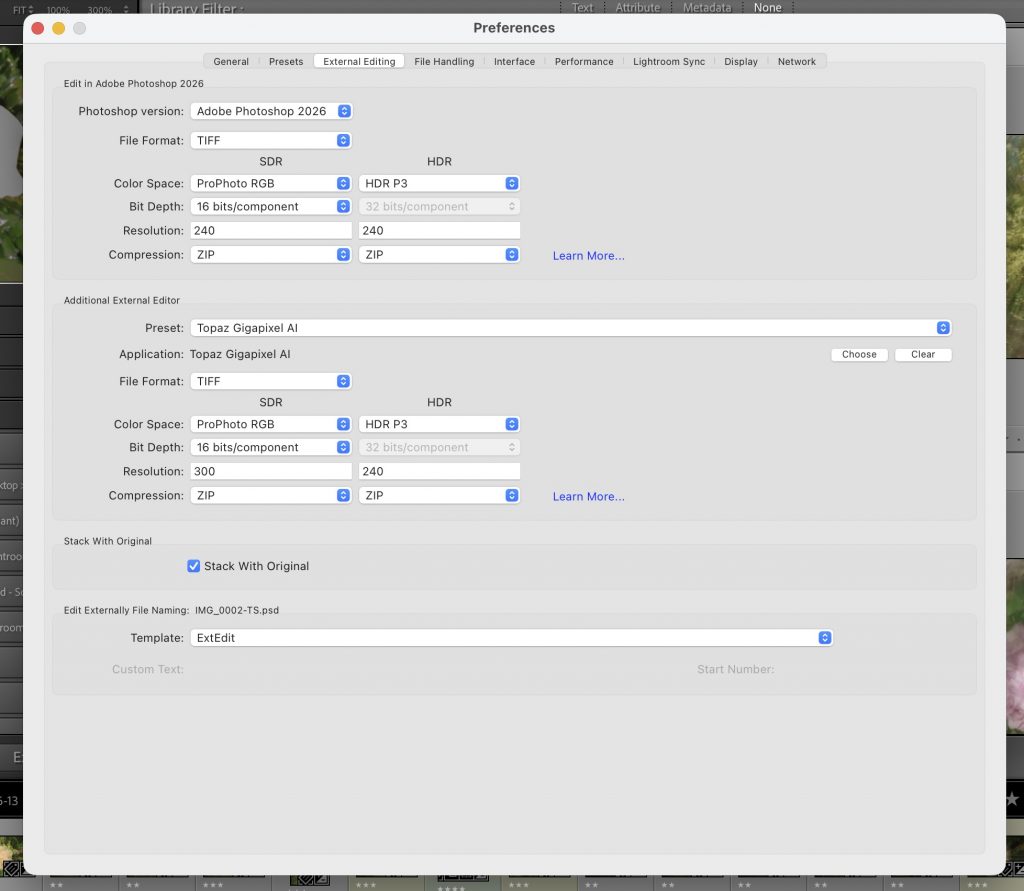
… so the image goes to the editor as a TIFF (NB LrC 15.4 enables a 12-bit image) and comes back as a Compressed DNG (using ZIP). This was all completely new information to me and changed my view of using the DNG file format. [Btw even Adobe don’t advise you to use .psd as a file format anymore.]
A thought … it’s probably a good idea to delete Photo AI from the Additional External Editor choices in the screen above which will prevent you choosing that method of editing rather than the “best” one – Library > File > Plug-in Extras.
PS Again, the image has nothing to do with the content.